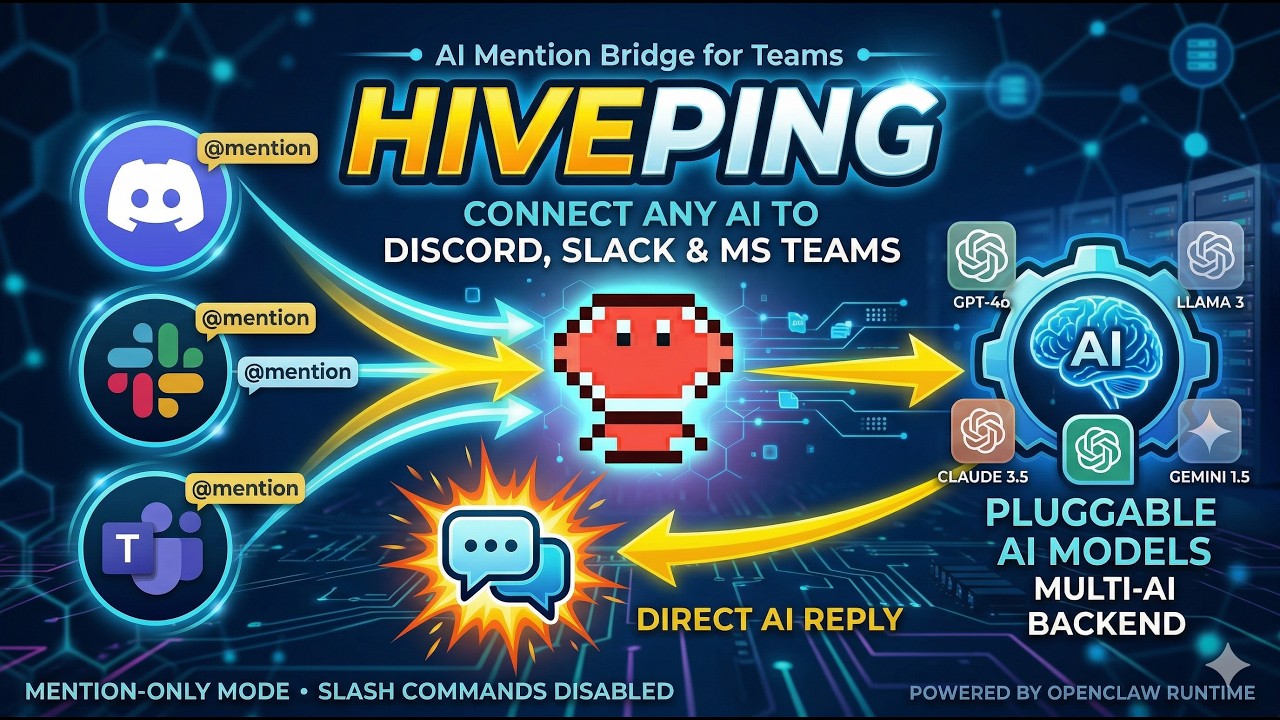
Conversation-scoped mention bridge for OpenClaw channels (Discord, Slack, Microsoft Teams) with Codex as the default reasoning backend.
HivePing runs in mention-only mode.
- Slash commands are disabled.
- Use
@hiveping ...in-channel, or mention the bot account directly (<@...>). - Both
<@bot> ...and<@bot> @hiveping ...forms are supported. - Slack native mention tokens like
<@U123456|botname> ...are supported; no Slack slash command registration is required for HivePing.
HivePing uses OpenClaw as the runtime and channel router.
- OpenClaw delivers inbound channel events to HivePing through plugin hooks (
message_received). - HivePing resolves conversation binding, role policy, and approval policy for that event.
- HivePing executes the configured reasoning backend for the bound repository (Codex by default).
- HivePing sends mention replies directly with
openclaw message send. - OpenClaw channel adapters deliver the final response to Discord, Slack, or Teams.
- Build plugin:
cd /home/node/.openclaw/workspace/hiveping
npm run build- Install by link:
docker compose run --rm openclaw-cli plugins install --link /home/node/.openclaw/workspace/hiveping- Enable plugin:
docker compose run --rm openclaw-cli plugins enable hiveping- Ensure plugin allowlist includes
hiveping:
docker compose run --rm openclaw-cli config set plugins.allow '["discord","device-pair","memory-core","phone-control","talk-voice","hiveping"]' --json- Configure plugin:
docker compose run --rm openclaw-cli config set plugins.entries.hiveping.config.reasoningCommand '/home/node/.openclaw/workspace/hiveping/bin/codex'
docker compose run --rm openclaw-cli config set plugins.entries.hiveping.config.reasoningArgs '["mcp-server"]' --json
docker compose run --rm openclaw-cli config set plugins.entries.hiveping.config.reasoningToolName 'codex'
docker compose run --rm openclaw-cli config set plugins.entries.hiveping.config.openclawCommand 'openclaw'
docker compose run --rm openclaw-cli config set plugins.entries.hiveping.config.allowedRoots '["/home/node/.openclaw/workspace","/workspace/YOUR_DIR"]' --json
docker compose run --rm openclaw-cli config set plugins.entries.hiveping.config.mentionHookEnabled true --json
docker compose run --rm openclaw-cli config set plugins.entries.hiveping.config.mentionAliases '["@hiveping"]' --json- Restart gateway:
docker compose restart openclaw-gateway- Verify status:
docker compose run --rm openclaw-cli plugins info hiveping
docker compose run --rm openclaw-cli channels statusUse this when creating fresh bots for mention-only @hiveping usage.
- Create app:
- Go to Slack API -> "Create New App" -> "From scratch".
- Pick your workspace.
- Enable bot user and install:
- Add a bot user under "App Home".
- Install app to workspace and copy the Bot User OAuth token (
xoxb-...).
- Configure bot token scopes (OAuth & Permissions):
- Required:
app_mentions:read - Required:
chat:write - Optional (recommended for richer context):
channels:history,groups:history,im:history,mpim:history
- Required:
- Configure event subscriptions:
- Enable "Event Subscriptions".
- Subscribe to bot event:
app_mention - If your OpenClaw Slack adapter requires message events, also add:
message.channels,message.groups,message.im,message.mpim
- If using Socket Mode (adapter dependent):
- Enable "Socket Mode".
- Create app-level token with
connections:write.
- Invite app to channel:
- In Slack channel:
/invite @YourBotName
- In Slack channel:
- Create app and bot:
- Go to Discord Developer Portal -> "New Application" -> "Bot" -> "Add Bot".
- Copy bot token.
- Enable gateway intents:
- Required:
MESSAGE CONTENT INTENT - Required:
SERVER MEMBERS INTENTonly if your adapter/user mapping needs member metadata - Recommended: keep
GUILDSandGUILD_MESSAGESenabled (non-privileged)
- Required:
- Bot permissions (OAuth2 URL Generator):
- Required:
View Channels - Required:
Send Messages - Required:
Read Message History - Recommended:
Embed Links,Attach Files,Add Reactions
- Required:
- Invite bot using generated OAuth2 URL:
- Scope:
bot - Scope:
applications.commandsis optional (HivePing does not require slash commands)
- Scope:
- Add bot to target channel and ensure role overrides do not block send/read.
docker compose run --rm openclaw-cli channels status
docker compose run --rm openclaw-cli plugins info hiveping
In channel:
@hiveping status
Expected:
- Slack/Discord channel receives one HivePing mention reply.
- No duplicate default model reply for the same
@hivepingmessage.
Run unit tests locally:
cd /home/node/.openclaw/workspace/hiveping
npm install
npm test
Run unit tests from Docker CLI:
docker compose run --rm openclaw-cli sh -lc "cd /home/node/.openclaw/workspace/hiveping && npm test"Enable local JSON role policy:
docker compose run --rm openclaw-cli config set plugins.entries.hiveping.config.rolePolicyEnabled true --json
docker compose run --rm openclaw-cli config set plugins.entries.hiveping.config.skillsFile '/workspace/YOUR_DIR/<repo-name>/.hiveping/skills.md'
docker compose run --rm openclaw-cli config set plugins.entries.hiveping.config.skillsMode 'agent'
docker compose run --rm openclaw-cli config set plugins.entries.hiveping.config.approvalRequestsFile '.hiveping/approval-requests.json'
docker compose run --rm openclaw-cli config set plugins.entries.hiveping.config.changeSandbox 'workspace-write'
docker compose run --rm openclaw-cli config set plugins.entries.hiveping.config.changeApprovalPolicy 'on-request'
docker compose run --rm openclaw-cli config set plugins.entries.hiveping.config.actionWebhookUrl 'https://hooks.example.com/hiveping'
docker compose run --rm openclaw-cli config set plugins.entries.hiveping.config.actionWebhookTimeoutMs 8000 --json
By default, when rolePolicyDir is not set, HivePing uses:
<bound-repo>/.hiveping/policies
Or do the same from mention chat (persisted):
@hiveping config defaults
Fine-grained updates:
@hiveping config set rolePolicyEnabled true
@hiveping config set reasoningCommand /home/node/.openclaw/workspace/hiveping/bin/codex
@hiveping config set reasoningArgs ["mcp-server"]
@hiveping config set reasoningToolName codex
@hiveping config set defaultModel gpt-5.4
@hiveping config set defaultProfile dev
@hiveping config set rolePolicyDir /workspace/YOUR_DIR/.hiveping/policies
@hiveping config set skillsFile /workspace/YOUR_DIR/<repo-name>/.hiveping/skills.md
@hiveping config set skillsMode agent
@hiveping config set approvalRequestsFile /workspace/YOUR_DIR/.hiveping/approval-requests.json
@hiveping config set changeSandbox workspace-write
@hiveping config set changeApprovalPolicy on-request
@hiveping config set actionWebhookUrl https://hooks.example.com/hiveping
@hiveping config set actionWebhookToken YOUR_WEBHOOK_TOKEN
@hiveping config set actionWebhookTimeoutMs 8000
@hiveping config show
Where to add policy files:
- Keep
rolePolicyDirunset to use the default per-project location:<bound-repo>/.hiveping/policies. - Or set
rolePolicyDirto a shared directory accessible inside the gateway container. - Recommended path per project repo:
/workspace/YOUR_DIR/<repo-name>/.hiveping/policies
Where to add skill routing file:
- Keep
skillsFileunset to use default:<bound-repo>/.hiveping/skills.md. - Or set
skillsFileto an explicit file path via@hiveping config set skillsFile <path>. - Set
skillsModeto control routing style:rules(default): parses structured markdown keys (action,method,url,match_any).agent: asks the configured reasoning backend to interpretSKILLS.mdsemantically, then falls back torulesif needed.
Example:
docker compose run --rm openclaw-cli config set plugins.entries.hiveping.config.rolePolicyDir '/workspace/YOUR_DIR/account-service/.hiveping/policies'
docker compose run --rm openclaw-cli sh -lc "mkdir -p /workspace/YOUR_DIR/account-service/.hiveping/policies"
Create one JSON policy file per project under your configured rolePolicyDir.
Example file path:
/workspace/YOUR_DIR/account-service/.hiveping/policies/account-service.json
{
  "version": 1,
  "defaultModel": "gpt-5.4",
  "defaultProfile": "dev",
  "members": {
    "email:engineer@company.com": "dev",
    "email:lead@company.com": "maintainer",
    "msteams:29:exec-user-id": "owner"
  },
  "permissions": {
    "ask": ["anyone"],
    "status": ["anyone"],
    "change": ["dev", "maintainer", "owner"],
    "bind": ["maintainer", "owner"],
    "unbind": ["maintainer", "owner"],
    "approve": ["maintainer", "owner"],
    "externalApi": ["owner"]
  },
  "approval": {
    "enabled": true,
    "approverRoles": ["maintainer", "owner"],
    "requireTicketForHeavyChange": true,
    "heavyKeywords": [
      "migration",
      "refactor",
      "architecture",
      "rewrite",
      "database schema"
    ]
  }
}
Notes:
projectIdis optional. If omitted, HivePing uses the bound repo folder name.repoPathis optional. If omitted, HivePing infers it from the default policy location (<bound-repo>/.hiveping/policies).defaultModelanddefaultProfileare optional. If set, they override the HivePing-wide defaults for that bound project only.- Keep
repoPathexplicit only when you use a shared/custom policy directory that is not under the bound repo.
Behavior:
- Run
@hiveping whoamifirst and copy a returned key intomembers. - Preferred key format is email-based (for example
email:engineer@company.com) because it is easier to manage. - You can also manage roles in-channel (writes to the same policy JSON):
@hiveping role set engineer@company.com dev@hiveping role remove engineer@company.com
- Read asks follow
permissions.ask. - Write asks (
change,update,edit,fix, or write-intent text) followpermissions.change. - Reasoning model/profile fall back in this order: project policy -> HivePing runtime config -> reasoning backend defaults.
- If user is below minimum change role, HivePing creates an approval request and returns an ID.
- Maintainer/owner approves with
@hiveping approve <request-id>. - Heavy write requests require Jira/GitHub ticket reference in prompt (for example
ABC-123or#245). - Role changes are persisted to project policy JSON and survive gateway restarts.
HivePing can auto-route normal @hiveping ... messages to external HTTP actions based on a project skill file.
Flow:
- User sends
@hiveping ...in Discord/Slack/Teams. - HivePing checks the bound repo skills file.
- If a skill matches, HivePing creates an approval request.
- Maintainer/owner approves via
@hiveping approve <id>. - HivePing executes real HTTP
GETorPOSTto that skill's URL. - If no skill matches, it continues normal ask/change flow through the configured reasoning backend.
Default skills file path:
<bound-repo>/.hiveping/skills.md
Also supported automatically:
<bound-repo>/.hiveping/SKILLS.md
Important:
- Keep
skills.mdorSKILLS.mdinside each project repository (the bound repo). - Do not store project routing files under the HivePing plugin repository.
Example SKILLS.md:
# Project Automations

When users ask HivePing to create Jira tickets, use:
- method: POST
- url: https://automation.company.com/jira/create

When users ask HivePing for deploy status of a service, use:
- method: GET
- url: https://automation.company.com/deploy/status
- response: return only `version_deployed`

Only route when the request is clear. If unclear, do not call any endpoint.Example skills.md:
# Skills

## Jira Issue Create
- action: jira.issue.create
- description: Create Jira issue from conversation
- match_any: create jira issue, jira ticket, raise jira
- method: POST
- url: https://automation.company.com/jira/create

## Deploy Status
- action: deploy.status
- description: Read deploy status
- match_regex: deploy\\s+status\\s+([a-z0-9-]+)
- method: GET
- url: https://automation.company.com/deploy/status
- response_field: version_deployed
Notes:
- Use markdown-native sections in
skills.md.
You can inspect loaded routes with:
@hiveping skills
If OpenClaw runs in Docker, bind host paths so HivePing can access repos and reasoning backend auth/config.
YOUR_DIR is a placeholder. Use your own folder name.
Create docker-compose.override.yml beside docker-compose.yml:
services:
  openclaw-gateway:
    volumes:
      - ~/.codex:/home/node/.codex
      - ~/YOUR_DIR:/workspace/YOUR_DIR

  openclaw-cli:
    volumes:
      - ~/.codex:/home/node/.codex
      - ~/YOUR_DIR:/workspace/YOUR_DIR
Then start/restart services:
docker compose up -d openclaw-gatewayIn any connected channel/thread:
@hiveping bind /workspace/YOUR_DIR/<repo-name>
@hiveping config defaults
@hiveping whoami
@hiveping skills
@hiveping role list
@hiveping role set engineer@company.com dev
@hiveping role remove engineer@company.com
@hiveping status
@hiveping summarize this repo architecture
@hiveping update route validation for empty slug and add tests
@hiveping unbind
HivePing supports two modes at the same time:
@hiveping ...keeps the existing conversation-scoped bind/unbind flow.@hiveping (project-a) ...or@hiveping project-a ...routes the request through a fixed project agent profile.
Important: these project agents are logical profiles behind the real @hiveping bot. You do not need to create extra Slack/Discord/Teams bot accounts for this mode.
What an agent profile gives you:
- a fixed repo path
- a fixed home conversation key for shared memory/history
- optional channel restrictions with
allowedChannels - support for multi-agent messages like
@hiveping (project-a) (project-b) investigate checkout failure - one final consolidated answer generated by the configured reasoning backend after both agents finish
Given this config:
{
  "mentionAliases": ["@hiveping"],
  "agents": [
    {
      "id": "project-a",
      "repoPath": "/workspace/YOUR_DIR/project-a",
      "homeConversationKey": "slack:default:C_PROJECT_A",
      "allowedChannels": ["project-a-room", "slack:default:C_PROJECT_A"]
    },
    {
      "id": "project-b",
      "repoPath": "/workspace/YOUR_DIR/project-b",
      "homeConversationKey": "slack:default:C_PROJECT_B",
      "allowedChannels": ["project-b-room", "slack:default:C_PROJECT_B"]
    }
  ]
}
Behavior:
@hiveping ...uses the repo bound in the current conversation.@hiveping project-a ...uses the fixedproject-arepo andproject-ahome history.@hiveping (project-a) ...does the same thing, but with a clearer visual indicator.@hiveping (project-a) (project-b) ...runs both agents independently, then asks the reasoning backend to return one final combined answer.- Parenthesized forms are treated only as leading routing indicators after the bot mention, so normal questions like
@hiveping what is meta(meta tags) of this projectare not rerouted accidentally. - If
allowedChannelsis set, that agent can only be used in matching channels.
Agent id alias rules:
- every agent id automatically works as the raw id, for example
project-a - every agent id also works in parenthesized form, for example
(project-a) - if an id contains spaces, prefer the parenthesized form, for example
(project a)
- Keep the normal HivePing alias enabled:
docker compose run --rm openclaw-cli config set plugins.entries.hiveping.config.mentionAliases '["@hiveping"]' --json- Get each agent's home conversation key from chat by running
@hiveping statusin the channel or thread you want to use as that agent's memory home.
Example:
# In the Project A home channel
@hiveping status

# In the Project B home channel
@hiveping status
Copy the Key: ... value from each reply.
- Save the agent profiles through OpenClaw config:
docker compose run --rm openclaw-cli config set plugins.entries.hiveping.config.agents '[
  {
    "id": "project-a",
    "repoPath": "/Workspace/.openclaw/organization/react-sample-app",
    "homeConversationKey": "slack:default:CHANNEL_ID",
    "allowedChannels": ["project-a-room", "slack:default:CHANNEL_ID"]
  },
  {
    "id": "project-b",
    "repoPath": "/Workspace/.openclaw/organization/project-account",
    "homeConversationKey": "slack:default:CHANNEL_ID",
    "allowedChannels": ["project-b-room", "slack:default:CHANNEL_ID"]
  }
]' --json- Restart the gateway:
docker compose restart openclaw-gatewayallowedChannels is optional. If omitted, that agent can be used anywhere the real @hiveping bot is available.
When set, matching is exact against whichever identifiers are available from the provider event, including:
- the normalized conversation key, for example
slack:default:CHANNEL_ID - raw conversation/channel ids
- provider metadata such as
channelNamewhen available
Best practice:
- include the exact conversation key for reliability
- optionally include the human channel name too for readability
From allowed channels:
@hiveping (project-a) status
@hiveping (project-b) status
From a shared integration channel:
@hiveping (project-a) (project-b) investigate checkout failure between frontend and api
Expected:
- each agent runs against its own fixed repo
- each agent uses its own home conversation memory
- HivePing returns one final consolidated answer from the reasoning backend
If you try an agent in a blocked channel, HivePing returns a clear "not allowed in this channel" message instead of falling back to generic repo binding.
Approval flow:
@hiveping update payment route for retry logic
# -> returns: Approval request created: appr_xxx
@hiveping approve appr_xxx
Reusable external-action approvals:
@hiveping what version is deployed right now?
# -> returns: Approval request created: appr_xxx

@hiveping approve appr_xxx --future 10 --scope requester
# allow the same requester to run the same external action 10 more times

@hiveping approve appr_xxx --future 1d --scope all
# allow everyone in that project context to run the same external action for 1 day

@hiveping grants
# list active reusable approvals for the current bound project / agent context

@hiveping revoke grant_xxx
@hiveping revoke appr_xxx
@hiveping revoke deployed.version
Notes:
- Reusable approvals currently apply only to external actions, not code changes.
- Matching is project-scoped and action-name scoped.
- In agent-profile mode, reusable approvals are also scoped to that agent profile by default.
--scope requesterreuses approval only for the original requester.--scope allallows any user in that same project context to reuse it until the limit expires.--future 10means the next 10 matching requests.--future 1d,12h,30m, and1ware also supported.- Grants are persisted in the default local store at
.hiveping/approval-grants.json.
Approval-gated external action:
@hiveping action issue.create {"tracker":"github","title":"Login callback fails","description":"OAuth callback returns HTTP 500 for some users","labels":["bug","backend"]}
# -> returns: Approval request created: appr_xxx
@hiveping approve appr_xxx
Webhook payload notes:
- For
@hiveping action ..., if payload hasmode=http, HivePing directly executes that HTTP action after approval. - For
@hiveping action ...withoutmode=http, HivePing callsactionWebhookUrlwith request metadata, approver metadata, action name, action payload, and recent discussion history. - If
actionWebhookTokenis set, HivePing sendsAuthorization: Bearer <token>.
Reject flow:
@hiveping reject appr_xxx not in current sprint
- Bindings are conversation-scoped.
- Mention text defaults to ask mode when command keyword is omitted.
- Recent
@hivepingconversation turns are persisted in.hiveping/history.jsonand included in subsequent prompts. - History is shared per conversation key and stores actor-tagged user turns, so concurrent users in one channel stay distinguishable.
allowedRootscontrols which paths@hiveping bindcan accept.@hiveping role setand@hiveping role removerequire maintainer/owner by default (permissions.bind).@hiveping config defaultsand@hiveping config setpersist in.hiveping/runtime-config.json.@hiveping ...requires reasoning backend auth/config inside the container. For Codex, mount/home/node/.codex.
- If you see
No API key found for provider "anthropic"for@hiveping ...messages, verify that:plugins info hivepingshows the plugin loaded.
- If mention replies are not sent, verify
openclawCommandpoints to a valid CLI binary in the gateway runtime (defaultopenclaw, fallbackopenclaw-cli). - Confirm the reasoning backend auth/config is mounted and valid in the gateway container. For Codex, verify
/home/node/.codex. - Rebuild and restart after source edits:
cd /home/node/.openclaw/workspace/hiveping && npm run build
docker compose restart openclaw-gateway- Verify plugin status:
docker compose run --rm openclaw-cli plugins info hiveping
docker compose run --rm openclaw-cli channels status